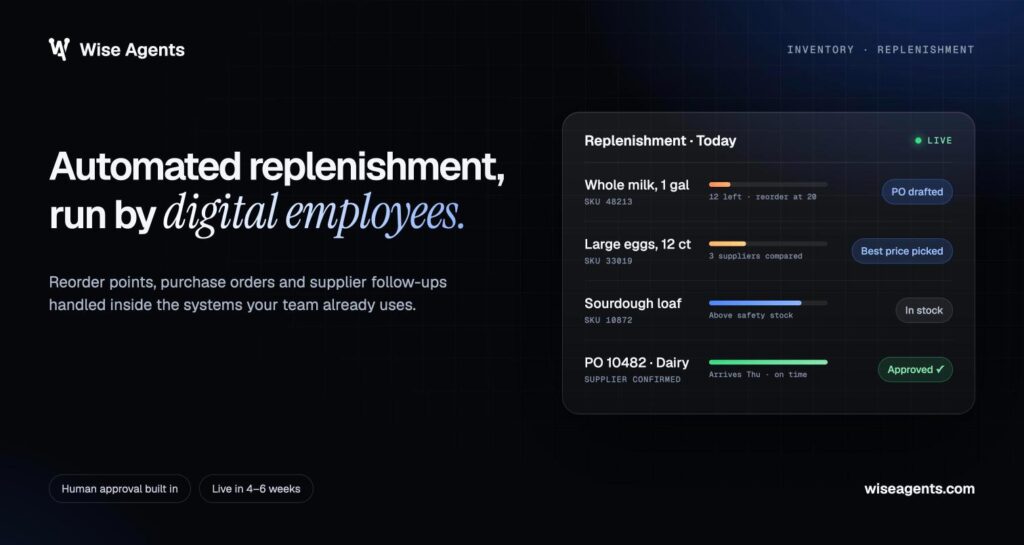
Digital employees are software that completes a defined job across your existing business tools, with people reviewing exceptions and approving the decisions that matter. For supply chain teams, that means moving purchase requests, quotes, shipment updates and invoices toward a finished outcome with far less repetitive handling. For a step-by-step view of one high-volume process, see how an invoice processing workflow runs from email capture to ERP posting.

The value comes from connecting the steps between systems. An incoming email becomes a checked request, the right records are pulled, and the next action reaches the right person with the supporting information attached.
The best way to start is with one measurable workflow. A focused project lets you set up reliable handoffs and see how much time it gives back to your team.
How Does a Digital Employee Complete a Defined Job?
We give each digital employee a specific responsibility, authorized access to the systems it needs, and rules for when to finish the work and when to escalate it. Every assignment has a clear starting event and a completion condition you can verify.
Working Across Existing Tools, From Input to Outcome
A workflow starts with an event, such as an incoming RFQ or a scheduled inventory check. The digital employee gathers the relevant information, checks it against your business rules and takes the actions it is allowed to take in the connected systems.
Our tailored digital employees are built around each customer’s existing process. An email request might mean reading an attachment, checking ERP records, preparing a draft, getting approval and recording the finished transaction.
AI handles the reading part: understanding documents and messages, pulling out the details and sorting requests. Business rules decide which actions are allowed.
How Do Digital Employees Differ From Chatbots and RPA?
The difference is the work they are given and the limits they operate within. Chatbots and virtual assistants usually give people a conversational way to ask questions or get help with a single task.
Classic robotic process automation (RPA) repeats predefined actions, such as copying structured data from one screen to another. A digital employee runs a broader business workflow, combining document understanding with system actions and approval steps.
Labels like digital workers, AI employees and AI agents overlap across the market. Instead of the label, look at the workflow being demonstrated: what starts it, which systems it changes, how it handles uncertainty and what proves the job is done.
Where Human Review and Exception Handling Fit
We build review points around decisions that need business authority. Pricing changes, supplier substitutions and anything payment-related should have explicit approval rules.
An exception should reach a named owner along with the original request, the relevant records and a clear explanation of the problem. Missing information should trigger a request for clarification or a review task.
Your team should also decide what happens while an approval is pending. The workflow needs a visible status and an escalation route for when the reviewer is unavailable.
Which Supply Chain Workflows Can Digital Employees Handle?
Our supply chain work focuses on recurring coordination tasks across purchasing, sales, logistics and administration. These workflows are good candidates for automation when the inputs and the definition of done are clear.
Purchase Order Processing, Supplier Communication and Follow-Ups
Purchase order processing works best as a sequence of controlled steps: checking required fields, pulling supplier details, preparing records and routing the transaction for authorized approval.
Our procurement workflows take in incoming requests, spot missing information, prepare RFQ drafts and track supplier responses. Using AI in procurement also covers follow-up sequences and tracking tables that show purchasing managers what is outstanding and what comes next.
Supplier communication needs its own limits. Routine reminders fit a repeatable process, while changes to commercial terms should go to the buyer who owns the relationship.
RFQ Intake, Quote Preparation and Approval
Our Quoting Digital Employee receives an RFQ by email, pulls the specifications out of the PDF and prices the line items using ERP data. The prepared quote then goes to a person for review before it is sent to the customer.
Reviewers need to see the quantities, the product matches and the records behind the proposed price. Unclear specifications stay flagged until someone resolves them.
We report an 80% reduction in manual data entry and 8× faster quote responses for this workflow. Results depend on the deployment, so your pilot should measure them against your own mix of requests.
Inventory Checks, Order Status Updates and Logistics Tracking
Digital employees can pull inventory information and watch stock levels or reorder points. Doing this reliably requires agreed definitions for available stock, reserved quantities and which system holds the official record.
For order status updates, a digital employee checks the connected records and prepares a reply with the latest information. Logistics workflows extend the same coordination to shipment tracking, warehouse activity, delivery paperwork and customer ETA updates.
The customer experience depends on that information being right. Stale shipment records and conflicting statuses should be flagged so a person fixes the discrepancy before a customer gets a promise nobody can back up.
Invoice Matching and Operational Reporting
Our administrative workflows validate invoices, match them to purchase orders and related records, and route discrepancies for review. Approval status and exception history stay part of the record.
Matching rules should spell out acceptable tolerances and the documents needed for a decision. A quantity mismatch needs different handling from a missing purchase order or a possible duplicate.
Scheduled reporting brings the same discipline to management information. Reports, alerts, sales briefings and end-of-day summaries should each be tied to an audience and a decision.
What Changes for the People Doing the Work?
We design the work so people spend less time moving information around and more time on cases that need judgment. That shift needs clear responsibilities and review steps that are easy to use.
Less Repetitive Entry, More Capacity for Exceptions
In procurement, the goal is to free up buyer time and speed up quote turnaround. Repetitive research and status chasing become defined workflow steps, while buyers keep responsibility for supplier decisions.
The remaining workload needs planning too. Reviewers need enough time to look at flagged cases, and managers need to see whether exceptions are piling up.
MIT CISR found that about 22% of surveyed enterprises reported major workflow redesigns around digital colleagues. It pays to look at how responsibilities change, not just at the technical setup.
Digital Employees vs. Digital Employee Experience
Digital employees are software doing operational work. Digital employee experience (DEX) is something different: how your human employees experience the workplace technology they use every day.
DEX covers reliable access, employee support and the effort it takes to finish everyday tasks. A digital employee adds another interaction to that digital workplace, so its review process belongs in your employee experience planning.
Adoption also needs plain communication. Explain what the software handles, what employees are still responsible for and how to report a problem.
Making Reviews and Handoffs Easy to Use
Good review screens put the proposed action right next to the evidence behind it. A reviewer should see the original request and the relevant records without piecing the case together from several inboxes.
Clear status labels and simple correction controls make each step faster to complete. Your team should also know where to report a confusing handoff and who decides whether the workflow needs to change.
How Can a Supply Chain Team Get Started?
Start with one repetitive process that has a clear owner and a measurable definition of done. That keeps the first project small enough to manage.
Choose One Repetitive Process With a Clear Owner
Pick work that repeats often and follows rules your team can explain. Tracking supplier responses or taking in RFQs is a much easier starting point than overhauling all of purchasing.
Assign one business owner with authority over the process. That person coordinates the reviewers and approves changes to the workflow.
The owner should describe today’s pain in operational terms, such as time spent re-entering requests, late follow-ups or a growing queue of unprepared quotes.
Define Inputs, Outputs and Success Criteria
Write down the documents and records needed to finish the job. For RFQ intake, that means the customer request, the product specifications and the pricing records that apply.
Be precise about the output. “Quote prepared for approval, with missing specifications flagged” gives your implementation team a target it can test.
Set a baseline before you automate anything:
- Requests received and completed
- Staff time spent handling them
- Turnaround time from request to completion
- Corrections needed after review
- Exceptions waiting for action
Keep those measures the same throughout the pilot so the comparison stays useful.
Map System Access, Approval Rules and Exceptions
List every system the workflow reads from or updates. Separate permission to look up information from permission to change a record or send an external message.
Write the approval rules in business language before implementation starts. State who approves a price adjustment, which changes need extra review and what the digital employee must never touch.
Include real exception examples from your process. Missing supplier details, duplicate requests and conflicting quantities each need a defined next step and an owner.
Pilot With Human Oversight and Measure Time Saved
Begin with a limited workload and review the results before allowing broader use. Include incomplete documents and other known problem cases in the pilot.
Measure the time staff spend reviewing and correcting results, along with the time taken off repetitive work. The real capacity gain is what remains after the review effort is counted.
At Wise Agents, our managed service covers the design, build and ongoing operation of your digital employees. Your team brings the process knowledge and the business approvals.
What Should You Check Before Expanding?
Expand only after the workflow shows reliable execution, clear escalation and a measurable benefit. More volume brings more exceptions and makes weak controls more costly.
Integration Fit, Data Quality and Access Controls
Check the exact records and actions needed in each system. A listed integration shows compatibility, but the implementation still has to confirm your configuration and workflow permissions.
Our integrations include Oracle NetSuite, SAP S/4HANA, Syspro, Epicor, Coupa, SAP Ariba, HubSpot, QuickBooks, Xero and Outlook. Your IT team should confirm the access method and the allowed operations for each system in scope.
Clean up duplicate supplier records, inconsistent item codes and conflicting status definitions before expanding. Access should stay limited to the data and actions the job actually needs.
Audit Trails, Escalation Ownership and Ongoing Support
Require a traceable record of important workflow actions: what information was used, what changed and whether a person approved it.
Our approach includes observable actions, audit logs and governance guardrails. Every exception should have a named owner and a visible resolution status.
Ongoing support needs the same clarity. Agree on who investigates failures and who authorizes a restart after a significant issue, and include your internal process owner in that arrangement.
Completed Outcomes, Total Costs and Regular Reviews
Measure completion at the business-process level. A supplier reminder sent is activity; a complete supplier response attached to the purchase request is progress toward the outcome you want.
Look at the full operating cost, including implementation, ongoing service and the time your team spends on reviews. Report freed-up staff time separately from financial savings unless those savings have actually been realized.
Regular performance reviews after go-live give you a set point to look at throughput, exception patterns, corrections and any changes needed before adding scope.
Start With One Workflow and Prove the Value
Treat your first digital employee as a bounded assignment with a human owner. Give it clear inputs and a defined finish line, then compare its performance with your baseline.
Expand based on evidence from completed work. Check the review burden and open exceptions alongside the time saved before adding another workflow or location.
If you have a process in mind, you can book a demo with our team to talk through its scope and the controls it needs. Bring a sample request, the systems involved and a description of what your team considers finished.
Frequently Asked Questions
What is an example of a digital employee in supply chain operations?
Our procurement digital employee handles request intake, prepares RFQ drafts, tracks supplier responses and follows up on missing information. Purchasing managers keep visibility through tracking tables and review any decision that needs their authority.
What is the difference between an AI agent and a digital worker?
“Digital worker” usually describes a software-based operational role, while “AI agent” describes a technical system that takes actions using the tools it has. The terms overlap, so check the assigned responsibility, the permissions and the human approval requirements instead of the label.
Do digital employees replace purchasing or operations staff?
The goal is to free up buyer time and speed up turnaround while purchasing staff keep the decision-making. Digital employees take on the repetitive work; people keep the judgment calls.
Can digital employees work with our existing ERP and email?
Yes. Our digital employees work inside existing systems, with integrations that include Oracle NetSuite, SAP S/4HANA, Syspro and Epicor, plus Outlook for email. We look at your setup and the actions you need during discovery to confirm the integration scope.
How long does it take to deploy a digital employee?
Our typical time from kickoff to go-live is 4–6 weeks for mid-market supply chain companies. Workflow complexity, system access and IT availability all affect the schedule.