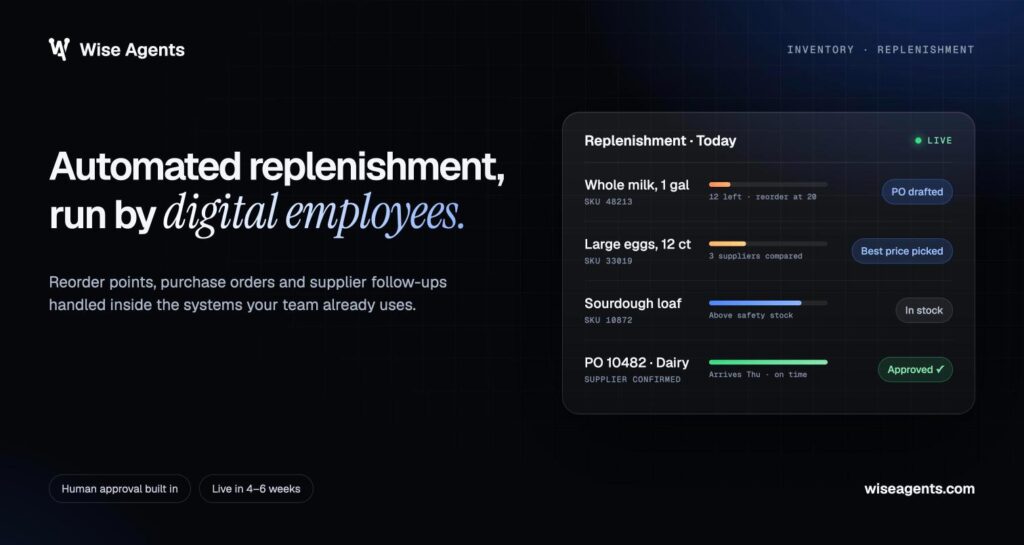
Supply chain automation connects your business systems and runs repeatable workflows, so orders, purchase requests, inventory updates, and delivery information move through approved steps with less manual handling. The best place to start is a recurring workflow whose delays and errors already cost you something measurable. Expand once that first workflow proves itself.

In supply chain management, the opportunity covers both the movement of goods and the information behind each transaction. A quote waiting for approval or an invoice missing a receipt record creates work that keeps bouncing between departments. For a step-by-step view of one high-volume process, see how an invoice processing workflow runs from email capture to ERP posting.
Good automation connects those handoffs and keeps people in the loop where judgment or sign-off is needed. You get a clearer path from an incoming request to a finished outcome, plus visibility into the exceptions that need attention.
How Does Automation Connect Supply Chain Work?
Automation carries information and actions across system boundaries under defined business rules. It helps to separate two things: running individual tasks, and coordinating the whole workflow, including approvals and recovery when something breaks.
From a Business Trigger to an Approved Outcome
A workflow starts with a clear event: an RFQ arrives, inventory hits a reorder point, or a carrier reports a delay. Workflow automation checks the information and starts the next permitted action.
Workflow orchestration handles the dependencies between those actions. In a quoting workflow, for example, an emailed RFQ moves through PDF spec extraction, ERP-based pricing, human review, and quote delivery. Each stage needs a completion condition, so missing information lands in a review queue before downstream work continues.
Rule-Based Automation vs. RPA vs. Digital Employees
The right technology depends on how variable the task is and which systems it touches:
- Rule-based automation runs explicit conditions, like routing purchases above an approval threshold.
- Robotic process automation (RPA) repeats screen actions, like entering fields in an application.
- Digital employees handle broader workflows that involve documents, business context, and multiple systems, with set controls and human supervision.
Our digital employees work across your existing tools to complete operational tasks. The difference matters when you’re choosing between a fixed transaction and a workflow that has to interpret incoming information before taking an approved action.
Where Machine Learning, Sensors, and Physical Automation Fit
When defining scope, keep information processing separate from physical execution. AI helps interpret documents, machine learning helps with pattern-based tasks like forecasting, and generative AI helps draft messages and summaries.
The internet of things (IoT) supplies equipment and shipment signals through connected devices. IoT sensors support condition monitoring and predictive maintenance, while warehouse robotics and automated guided vehicles (AGVs) move goods. Each one needs its own operating controls, and software ties their events into the wider business process.
Which Supply Chain Processes Can You Automate?
Repeatable information handling and coordination are good candidates across the supply chain. Look at each process from intake to completion, including what happens when information is incomplete or something goes wrong.
Order-to-Cash: Quotes, Orders, Billing, and Collections
The goal here is less repeated data entry between sales and finance. A connected workflow pulls request details, checks product and customer records, prepares a quote, and sends commercial exceptions for approval.
After the customer accepts, automation helps with order entry and billing handoffs. Collections workflows check invoice status and schedule approved reminders. Set up separate handling for disputed charges, credit holds, and changed payment terms so routine follow-up stays in line with account decisions.
Procure-to-Pay: Purchasing, Supplier Follow-Up, and Invoice Matching
Automated procurement covers intake checks, RFQ preparation, supplier response tracking, and purchasing status updates. Supplier management also includes onboarding checks that catch missing documents before a new supplier record goes live.
AI in procurement works best when it’s scoped around the buyer’s workflow and authority. Intelligent document processing (IDP) pulls information from supplier documents, then invoice matching compares invoices with purchase orders and receipt records. Quantity differences and price discrepancies should go to the right reviewer before payment is approved.
Inventory and Replenishment: Stock Signals, Forecasts, and Reorder Approvals
Inventory management automation combines inventory tracking with replenishment rules. A useful workflow checks available stock, open purchase orders, committed demand, and lead times before preparing a reorder recommendation.
Inventory optimization is still a planning decision, and it depends on reliable records. Demand forecasting estimates future needs, while demand planning adds commercial assumptions and operating limits. Demand planning automation should show those assumptions and flag unusual changes for review before anyone commits to a purchase.
Warehouse and Logistics Coordination: Fulfillment, Dispatch, and Exceptions
Warehouse automation covers information workflows as well as equipment. Automated order fulfillment coordinates order release, picking instructions, packing confirmation, and shipping documents, as long as the systems involved give dependable status updates.
For logistics automation, the key is the handoff between warehouse operations and transportation management. Shipment tracking feeds dispatch updates and exception queues. Route optimization and last-mile delivery tools need current constraints, like delivery windows and vehicle capacity, and proposed changes need escalation rules when they affect customer commitments.
Customer Service: Order Status, Delivery Updates, and Escalations
Order-status automation pulls the latest approved information and sends a consistent response. Tie each message to a timestamped operational record, especially when an ETA changes.
Customer service workflows also need a clear escalation path. A delivery exception, a repeated delay, or a request to change an order should reach someone with authority, with the conversation history attached. That way the customer doesn’t have to repeat themselves while your team looks into it.
Reporting: Operational Summaries, Alerts, and Decision Support
Scheduled reporting pulls activity from across systems into operational summaries. Data analytics improves supply chain visibility by connecting order status with inventory and shipment information.
The most useful alerts name a specific condition and the person responsible for the next step. A late-order alert should include the affected order, its latest status, and the action required. Reports should show when they were last refreshed so you know whether you’re deciding on current information.
Which Process Should You Automate First?
The strongest first candidate is a repeatable, costly workflow with accessible data and a clear owner. That combination keeps your automation strategy tied to real operational value and keeps delivery risk manageable.
Score Workflows by Volume, Error Rate, Delay Cost, and Data Readiness
Compare candidate workflows using the same evidence. A simple high, medium, or low rating makes the differences clear without pretending to be more precise than it is.
| Factor | What to measure | What strengthens the case |
|---|---|---|
| Volume | Requests or transactions per period | Frequent, repeatable work |
| Error rate | Corrections, duplicates, and rework | Documented avoidable errors |
| Delay cost | Effect of waiting on operations or revenue | Clear cost of missed deadlines |
| Data readiness | Availability and consistency of required records | Accessible, dependable inputs |
Labor shortages strengthen the case for freeing up time spent on recurring admin. Supply chain disruption adds urgency to coordination workflows, but supply chain optimization still needs a defined process and usable inputs.
Choose a Bounded Workflow With a Clear Owner and Baseline
Pick something with a specific start and finish, like preparing an RFQ draft from an approved purchase request. A scope like “automate procurement” leaves too many open questions for a first deployment.
Name an owner who controls the process and signs off on acceptance criteria. Before implementation, capture current handling time, elapsed time, error frequency, and completion volume. Include both routine work and exceptions so the baseline reflects the team’s real workload.
Design Exception Handling Before Expanding Automation
Build the exception queue before widening scope. Missing specs, unavailable products, and conflicting records each need a named owner and a way to get resolved.
Scenario planning should cover a system outage or a sudden spike in volume, not just supplier failure. Diversified sourcing adds checks around approved alternatives and contract terms. Whenever a substitution changes cost or customer commitments, automation should surface the options for an authorized person to review.
How Do You Implement Automation Without Replacing Your Core Systems?
You build automation around your existing systems by connecting their records and adding controlled workflows between them. Each system keeps its role. What changes is that you define where information starts, where decisions happen, and where approved changes get recorded.
Evaluate Software and Managed Services Against Your Workflow
Judge supply chain automation software against a real end-to-end process from your business. Ask providers to show how they handle incomplete inputs and approval changes, not just clean transactions.
When comparing supply chain automation tools and managed services, look at who owns integration, monitoring, maintenance, and workflow changes. Our managed service covers the design, build, and ongoing operation of tailored digital employees built around your process. Whatever you’re considering, get clear on who investigates failures and keeps performance up after deployment.
Connect ERP, Warehouse, Transportation, and Order Systems
Enterprise resource planning (ERP) holds core business records, warehouse management systems (WMS) track warehouse execution, transportation management systems (TMS) handle transport activity, and an order management system moves orders along.
Before connecting any supply chain software, document the system of record for every critical field. Systems we connect with include Oracle NetSuite, SAP S/4HANA, Syspro, Epicor, Coupa, SAP Ariba, HubSpot, QuickBooks, Xero, and Outlook. The actual scope still depends on access permissions, available interfaces, and how your systems are configured.
Fix Broken Processes and Master Data Before Deployment
Automation repeats whatever process you give it, including the unnecessary parts. Remove duplicate approvals and settle unclear ownership before turning the workflow into production rules.
Master data needs the same attention. Reconcile product identifiers, units of measure, supplier records, customer accounts, and location codes. If the same item shows up under different identifiers, fix the mapping before automated transactions start writing changes across systems.
Assign Exception Owners, Approval Rules, and Recovery Procedures
Every exception category needs a responsible person or queue. Decide which actions run automatically, which need approval, and which stop the workflow.
Recovery procedures should explain how to resume interrupted work without creating duplicate transactions. That means transaction IDs, audit logs, controlled retries, and reconciliation checks. Your approval rules should also say who handles urgent requests when the usual reviewer is out.
Pilot, Train the Team, and Review Performance After Go-Live
Run a bounded pilot with representative work and acceptance criteria agreed up front. Training should cover reviewing outputs, resolving exceptions, and reporting issues.
After go-live, review performance on a regular schedule. Check quality and unresolved exceptions before extending the workflow to more locations or transaction types.
How Do You Measure Results and Calculate ROI?
Measure automation against completed business outcomes and the full cost of delivering them. Keep operational performance separate from financial benefit, so better throughput doesn’t turn into a savings claim you can’t back up.
Track Cycle Time, Accuracy, Service Levels, and Cost per Completed Outcome
A short list of metrics with consistent definitions works best:
- Cycle time: Elapsed time from accepted intake to approved completion.
- Accuracy: Completed transactions that needed no correction.
- Service level: Work completed within the agreed deadline.
- Cost per completed outcome: Relevant operating cost divided by successfully completed transactions.
Track manual handling time separately from elapsed time. A workflow that cuts data entry but leaves an approval bottleneck in place gives a very different result from one that shortens customer response time. Customer satisfaction adds useful context when the workflow affects communication or delivery commitments.
Separate Released Capacity From Cash Savings and Commercial Gains
Released capacity means your people have time for other work. Cash savings need a documented drop in spending, like lower overtime or lower outsourced processing costs.
Commercial gains are a third category. Extra quoting capacity only creates financial value when it brings in new business you can attribute to it, so use contribution margin when you calculate that benefit. Productivity gains should also have a stated use, like absorbing higher volume or clearing a backlog.
Calculate Net Benefit and Payback Using Full Operating Costs
For first-year economics, use the same scope and time period for both costs and benefits:
Year 1 net benefit = Year 1 attributable financial benefit − Year 1 total cost
Year 1 ROI = Year 1 net benefit ÷ Year 1 total cost × 100%
Include implementation, integration, training, ongoing service, usage charges, and internal supervision time. Add hardware and maintenance if physical automation is involved. Keep released capacity and service improvements you can’t put a dollar figure on in their own categories.
For payback, find the point where cumulative net cash benefits cover the initial investment. Account for ramp-up and recurring costs, and say whether the calculation covers implementation alone or a broader investment. Running a conservative scenario and a higher-adoption scenario shows how sensitive the result is to transaction volume.
Measure Exceptions and Business Outcomes, Not Just Activity
A transaction only counts as successful once it reaches its defined completion state. An email sent is activity. An approved quote delivered to the right customer is an outcome.
Track exception rate, review effort, repeat failures, and how long items sit in the queue, alongside completion volume. Predictive analytics should be checked against what actually happened, like forecast accuracy and replenishment performance. Automated supply chains still need proof that their recommendations and actions improve operations under real conditions.
Start With One Measurable Workflow, Then Expand
A dependable automated supply chain grows one proven workflow at a time. Expand only after your first deployment hits its agreed quality and service targets.
Keep the same discipline as your automation strategy grows: set a baseline, assign an owner, confirm your data is ready, and measure full operating costs. Then use the results to pick the next handoff to connect.
If you have a recurring workflow in mind, book a demo with our team to talk through scope and requirements. Bring a sample request, its approval steps, and how long it takes today, so the conversation starts with your actual operation.
Frequently Asked Questions
Can supply chain automation work with a legacy ERP?
Yes, as long as there’s an approved way to reliably access the records and actions you need. Interfaces, permissions, and transaction controls get checked before scope is set. The ERP stays responsible for its records, and connected workflows handle the handoffs.
Do you need warehouse robots to automate supply chain work?
No. Digital workflows run independently of warehouse robots. Software handles document work and coordination across systems, while physical warehouse automation deals with moving materials. Equipment makes sense when the bottleneck is physical handling.
Will AI replace supply chain teams?
Our digital employees work alongside your team, with people supervising results and reviewing decisions where the process calls for it. The focus is recurring operational work that eats up staff time. Commercial decisions, exceptions, and relationship management stay with your people, and those responsibilities get defined early.
How long does supply chain automation take to implement?
For mid-market supply chain companies, our typical timeline from kickoff to go-live is 4–6 weeks. Integration complexity, data cleanup, and available IT resources affect the schedule, so the deployment plan is confirmed after reviewing the workflow and the systems involved.
What should you look for in a supply chain automation company?
Look for a provider that can show your workflow working end to end and takes clear responsibility for deployment and ongoing support. Ask how their tools handle approvals, audit trails, and interrupted transactions. Insist on success criteria tied to completed outcomes and a plan for reviewing performance after launch.